
I Tested Wix's New AI Website Builder (Wix Vibe) – Here's What Happened
Last updated: March 19, 2026 • Originally published January 5, 2026
Looking for an honest Wix Vibe review? I spent hours testing Wix's new AI website builder so you don't have to. Here's what actually happened when I tried to build a professional website using only AI prompts—including the mobile disaster, editing nightmares, and surprise credit limits that made me question if AI website builders are ready for real businesses.
Can AI Really Build Your Website?
Okay, so I heard that Wix has a new AI website builder called Wix Vibe, part of the vibe coding trend, and I thought I would give it a try and see if I'm going to lose my career to AI. Hopefully robots aren't coming for web designers just yet, for my sake.
I wanted to test out Wix Vibe to see what the hype is about. According to their marketing, you can "vibe code" a website by describing your vision and watching it build into a functioning site. My suspicion going in was that it probably just builds you a customized Wix template instead of making you pick from their existing library. But AI technology is obviously pretty powerful and getting better every day, so let's find out.
Getting Started with Wix Vibe
When you first land on the site, you create an account with your email and password. Then it asks what kind of creation experience you're looking for. You can choose regular Wix AI website creation, or Wix Vibe where you vibe code a site from a text prompt.
Vibe is the one people are most curious about right now. It's in beta mode, but usually that means the product is still pretty ready-for-market, but might have some bugs. The pitch is "Experience something new with Wix Vibe. It creates one-of-a-kind sites from your prompt, shaped by your ideas and powered by AI."
I went with the full AI prompt method to see what it could do.
Building a Site with AI Prompts
I needed to pick a business type for testing, so I went with a workplace consulting services business. Something that helps employees navigate workplace issues. Simple enough concept.
I gave it specific design requirements:
-
Navy blue and white color palette
-
Professional, modern look
-
Minimal animation
Wix Vibe confirmed my brief and said the blueprint was ready. Then it started building.
What Wix Vibe Actually Generated
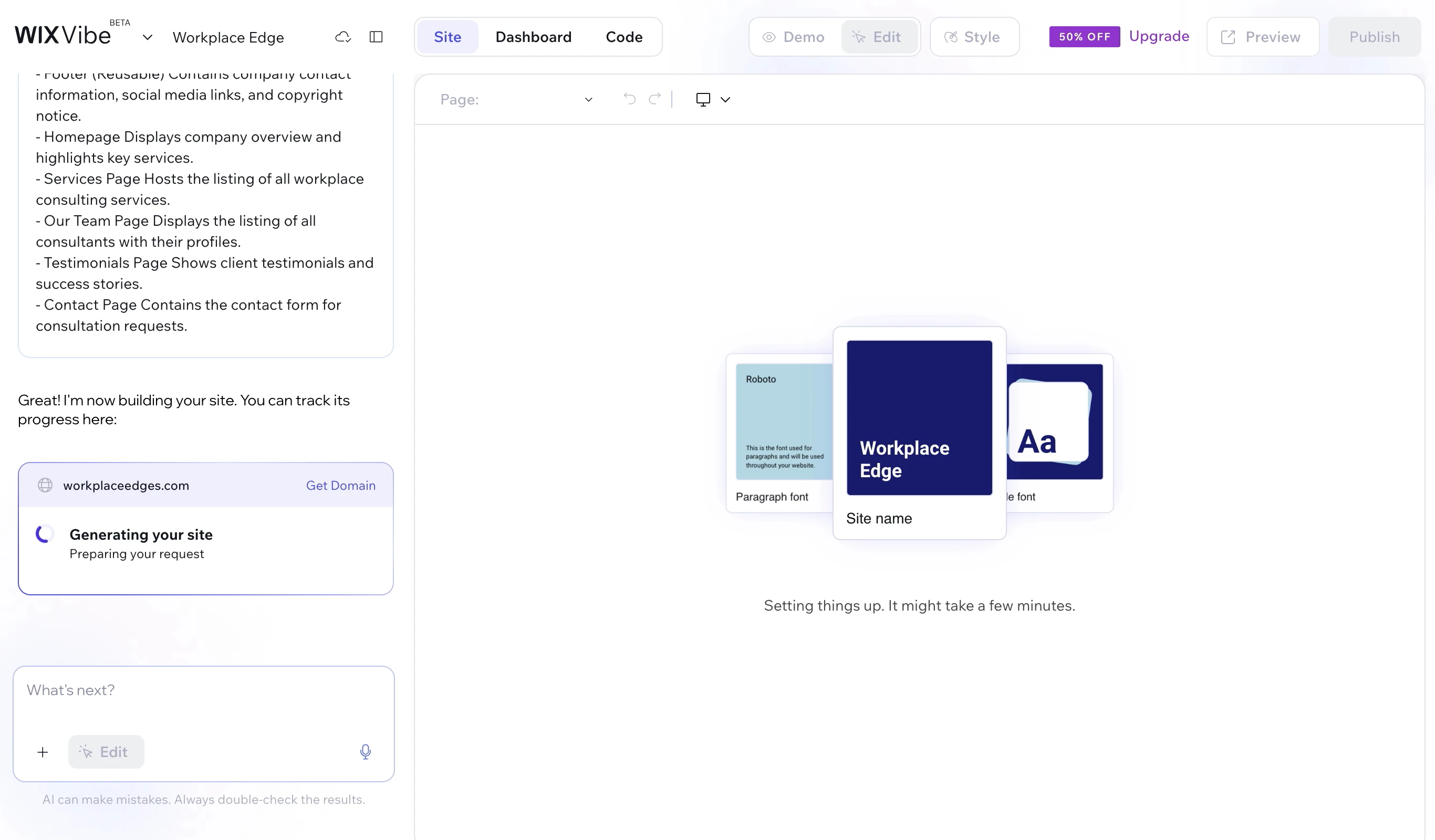
The AI started developing the color palette I described. Navy blue and white. Except it also added this seafoam green that I definitely didn't ask for and wasn't loving. I figured maybe I could edit that later.
It took about five minutes to generate everything. The AI created a domain name for me, picked some fonts, generated AI images of people, and built out the structure.
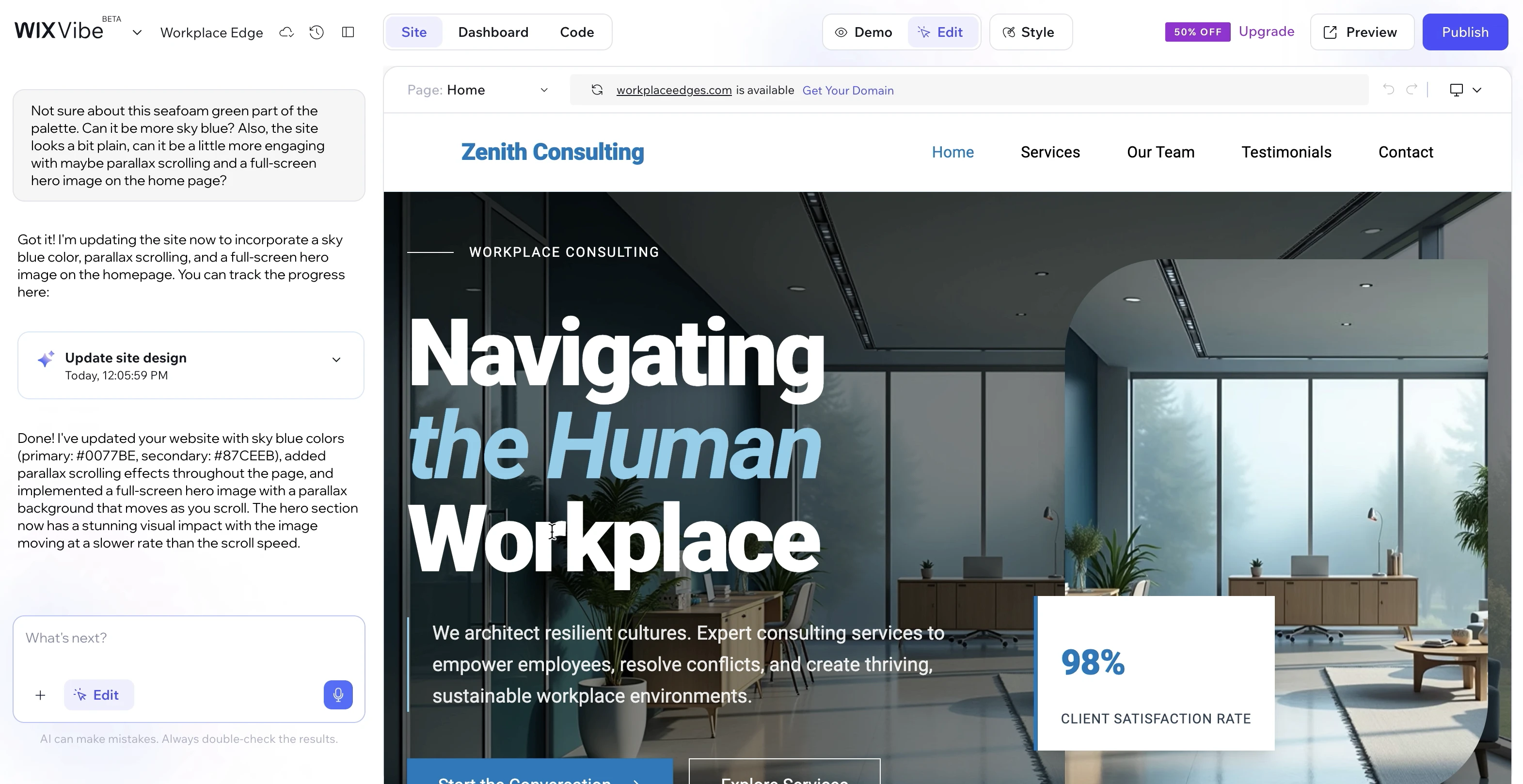
It created a very standard five-page template (not bad) with Home, Services, Our Team, Testimonials, and Contact pages. The hero section said "Navigating Human Workplace" (which I found kinda funny and fitting for an AI to choose as a heading) with a minimalist design. Exactly what you'd expect from a regular template.
The AI images all looked very AI. You know that slightly off, too-perfect look. But theoretically you could swap those out later with real photos or stock images.
It created some placeholder copy, made up service descriptions, invented team member names with AI-generated headshots, and even wrote fake testimonials with star ratings. Pretty much what you'd get if you picked a pre-made Wix template.
Trying to Edit the AI-Generated Site
Great, so it's time to customize. This is where things got interesting because, ultimately, I think this is really the area where AI website building has an opportunity to demonstrate the technology and actually compete with human designers. (It's the part I'm currently most concerend about.)
I didn't like the seafoam green, so I asked "Can it be more sky blue?" I also thought the site looked too plain and basic, so I requested parallax scrolling effects and a full-screen hero image to make it more engaging.
Wix Vibe showed this little wave animation going through the page while it updated. Kind of cool to watch.
The result: it changed the seafoam green, but it also changed my navy blue to a lighter, mid-tone blue. I liked the navy blue! I just wanted to get rid of the green. But okay, at least the green is mostly gone.
Then things got weirder. It added the full-screen hero image like I asked, but it kept the original image too. So now I had the same image layered on top of itself. Not exactly what I meant.
The Mobile Version Disaster
I checked the mobile version and it was pretty broken.
The navigation was basically the desktop version cropped into a mobile shape, so a few of the navigation items we offscreen. The text below the nav was smashed directly against the bottom of the nav bar with weird spacing. Normally you'd have either smaller text that fits within the nav for those items, or a hamburger menu (those three lines) that opens to show your navigation options. This had neither.
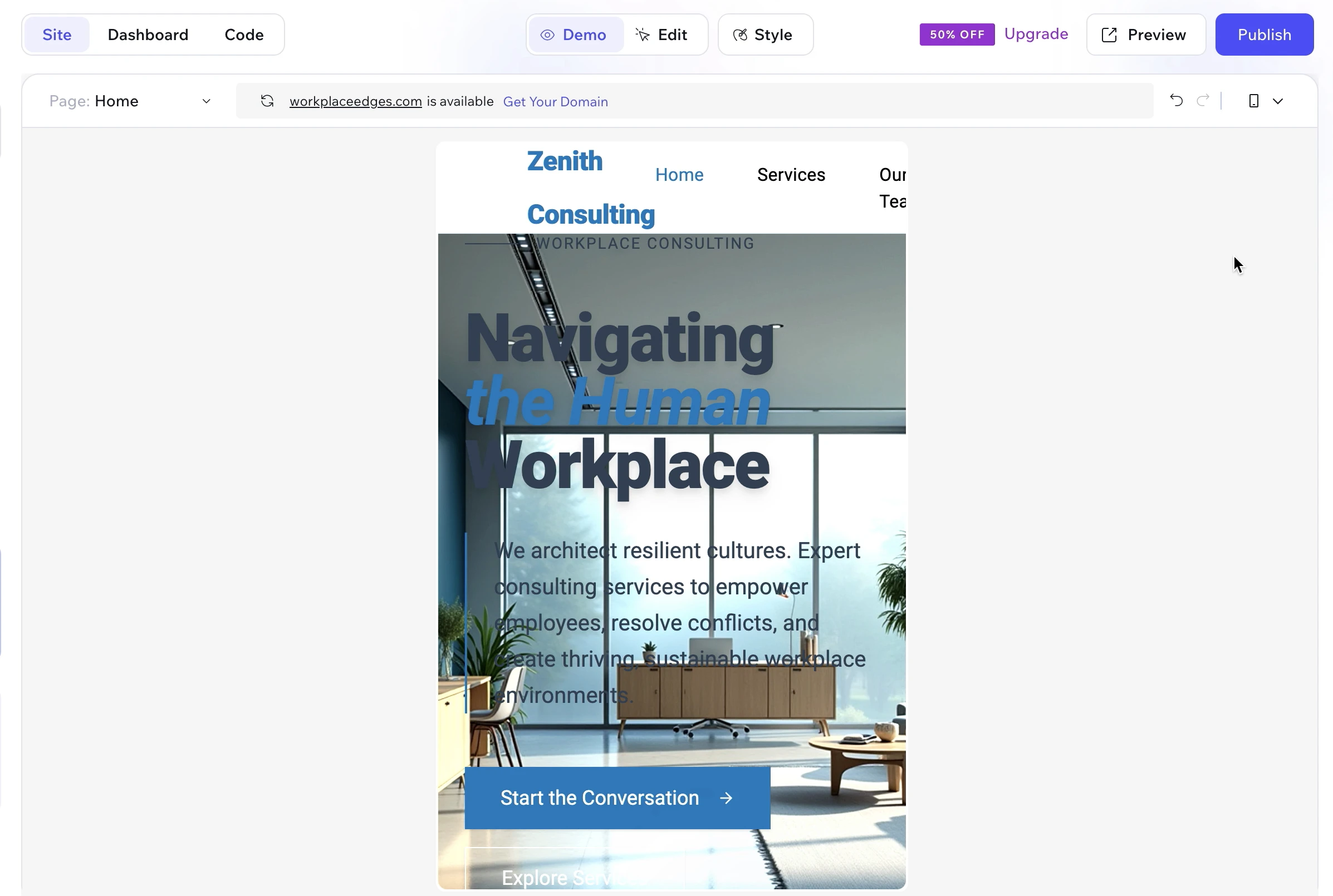
The page had tons of empty white space on the right side where you could scroll horizontally, which you shouldn't be able to do on this particular mobile site. The footer was cut off. Other pages were just the desktop version cropped (poorly) into a mobile frame.
In a mobile-first world, this is a dealbreaker. If your no-code website builder can't handle responsive design, what's the point? The mobile version was completely unusable.
More Editing Attempts (And More Problems)
Back to desktop mode. I tried to fix the duplicate image situation in the hero section. I wanted to delete the foreground image and just keep the background hero image.
I kept trying to delete the container with the duplicate image, but even after the image disappeared, invisible containers remained. There was this color difference in the hero section where the deleted image used to be, and I couldn't get rid of it. The system just wasn't letting me fully remove those layers.
Moving on. That shadowy AI-generated team image looked way too mysterious and dramatic for a workplace consulting business. I asked the Wix Vibe: "Can this image be less of a silhouette?"
The AI responded: "I've reduced the overlay darkness on the hero image from 50% to 20%."
Ok, great! Except that nothing actually changed upon checking the image.
I told it the image looked the same. It said it was verifying if changes are visible and would try again. After another attempt, it claimed to have "added brightness and contrast filters, reducing the overlay from 20% to 5%."
Still looked exactly the same. I gave up on the image and moved on.
Things Started Breaking
I noticed the "Our Expertise" section was too much blue now. I asked if it could make the service area cards white so we'd have some contrast. This should be pretty simple.
It worked! Pretty simple swap. The cards turned white, the text color reversed to stay readable. Great.
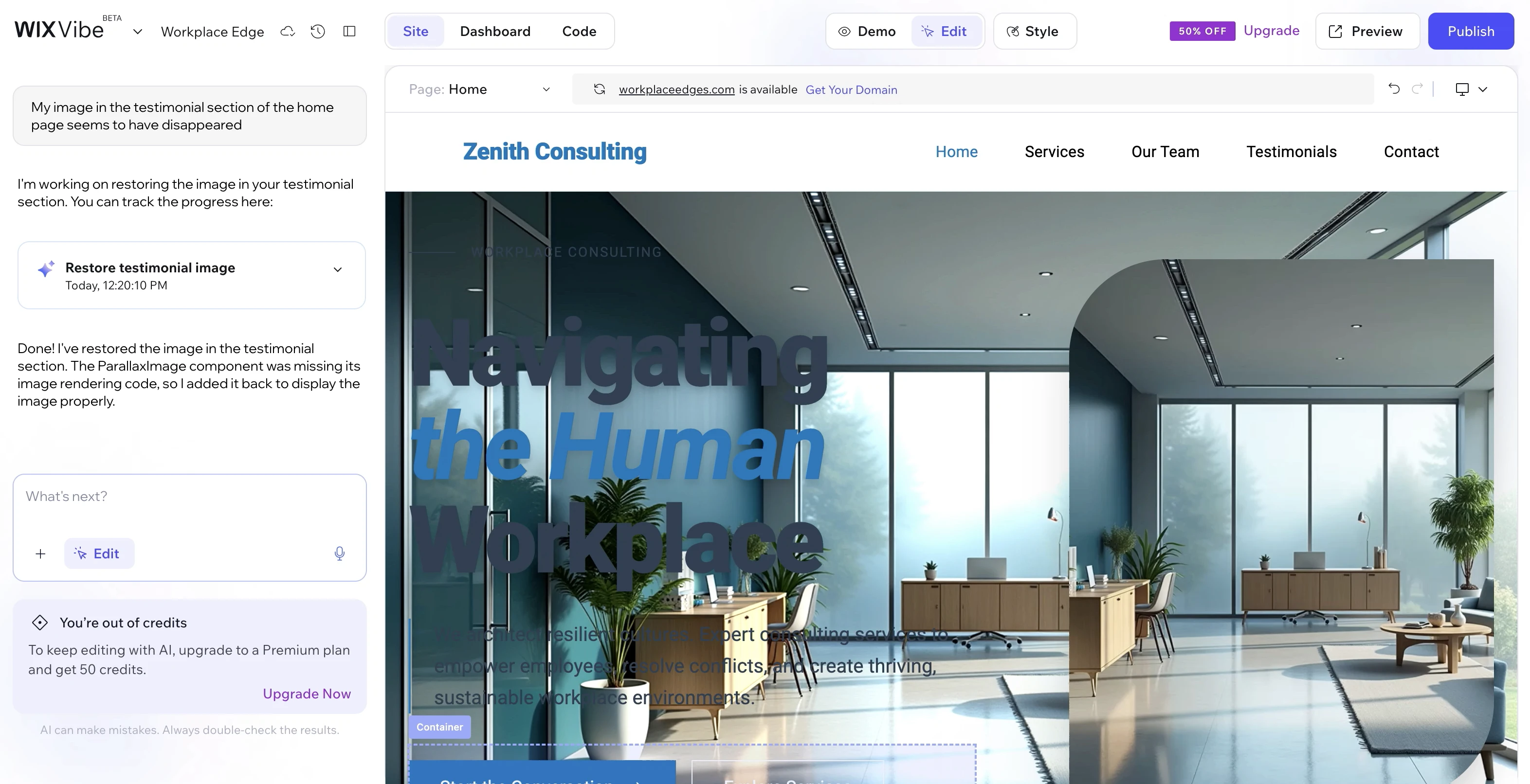
Then I scrolled down and noticed my testimonial section image had completely disappeared. There was an image there before, and now it was just gone.
I told the AI: "My image in the testimonial section of the homepage seems to have disappeared."
It said it was restoring the testimonial section image. The wave animation started again. An image came back, but the positioning was a little weird and the guy's face was kind of cut off. Whatever, at least there's an image.
Then I got a popup: "Out of credits. To keep editing with AI, upgrade to a premium plan and get 50 credits."
But here's the thing. When I went back to the top of the page, it had put back the duplicate image I deleted earlier. And it changed the text color back to dark (an issue it had originally corrected on its own), so now I had dark text on a dark background again. Completely unreadable. So it's literally undone its own work.
So now I had an unusable hero section that would need to be completely redone, and I was out of credits. I'm supposed to pay for this now?? It's almost as if they give you just enough credits to determine that the product is definitely not worth paying for, and then they as you if you'd like to pay for it.
My Verdict
The finished result is... not totally usable.
I will say that it is cool to see the AI do things when you give it a prompt. Watching it make changes based on what you're asking for is neat. However, I honestly feel like this is more work than just choosing a pre-existing template that Wix already has and then editing that.
This is slower and more frustrating because it looks like it's doing what you're asking, and then it undoes things that you've already spent time on. The mobile versions are completely screwed up and unusable. And then after all that, when you run out of credits, they want you to pay to keep using it.
I would not pay for this at this point.
Back in code school, we learned about MVP, which stands for minimum viable product in software engineering. It means the bare minimum of what you can put out when it's done well enough to release on the market and have people test it out, meaning that it should be a usable product (yes, even in Beta).
I honestly wouldn't consider this MVP because I don't consider it to be usable, primarily because the AI-generated website can't even handle mobile responsiveness. That's so important, especially in a mobile-first world. Websites have to be responsive and work on all devices. This one does not make the mark.
Wix Vibe vs. Other AI Website Builders
How does Wix Vibe stack up against other AI website builders on the market? Tools like 10Web, Durable, and Hostinger's AI builder all promise similar "describe your vision and watch it build" functionality.
From my testing of Wix Vibe, the main dealbreakers were mobile responsiveness failures and unstable editing that would undo previous changes. If you're considering AI website builders, those are the two critical areas to test thoroughly: make sure the mobile version actually works and that edits stick when you make them.
That said, based on what I've seen across the board with AI website builders, they all have similar limitations. They're essentially template generators with a conversational interface. If you need a website that represents your brand professionally and works flawlessly across all devices, working with an experienced web designer will give you significantly better results than any AI builder currently on the market.
What I'd Recommend Instead
If you really want to make your own design for your website (or don't have a choice because of budget limitations, etc.), what I would recommend is creating a mockup using ChatGPT, Midjourney, or another image generator. Just tell it to design a website for your brand as an image.
Then either try to replicate that yourself in a website builder, or work with a professional web designer who can build you a custom site or customize a DIY website builder properly, and send them that mockup as your example of what you're going for. A designer can put that together for you either as a custom site or in a website builder (even though that's more limited). But honestly, if you're going to invest in working with a professional designer, you're much better off just working with them to communicate your vision and goals, and then letting them do what they do best, which is to create the design for you.
Either way, I think those options would be less frustrating than trying to do it with Wix Vibe because this had so many problems. There's definitely no way I would pay for this myself, at least not in its current state.
Frequently Asked Questions About Wix Vibe
Is Wix Vibe free?
Wix Vibe is free to try, but you get limited AI credits. Once you run out of those credits, you need to upgrade to a premium Wix plan to continue editing with AI. In my testing, I ran out of credits before I could even finish fixing the major issues with the site.
Does Wix Vibe work on mobile?
In my testing, Wix Vibe's mobile responsiveness was seriously broken. The mobile version had navigation items cut off the screen, awkward spacing issues, horizontal scrolling where there shouldn't be any, and a cut-off footer. For a tool launching in 2026 when mobile-first design is standard, this was a dealbreaker.
Is Wix Vibe better than regular Wix templates?
No. At the time of this article being written, using a pre-made Wix template and customizing it yourself is still significantly faster and less frustrating than trying to build with Wix Vibe. The AI often undid changes I had already made, and simple edits that should have been straightforward became complicated troubleshooting sessions.
How long does it take to build a website with Wix Vibe?
The initial AI generation takes about 5 minutes, which is impressive. However, the editing and troubleshooting phase took much longer due to bugs, limitations, and the AI making changes I didn't ask for. What should have been a quick customization turned into an hour-long frustration.
Can I use my own images in Wix Vibe?
Yes, theoretically you can swap out the AI-generated images for your own photos or stock images. However, I encountered significant issues during editing where images would disappear entirely or reappear after I had deleted them. The image handling was definitely one of the buggier aspects of the platform.
Is Wix Vibe worth paying for?
In my opinion, no—at least not in its current state. The mobile responsiveness issues alone make it unusable for a professional business website. Combined with the buggy editing experience and the fact that it's essentially just generating a basic template you still have to heavily customize, I don't see the value in paying for premium credits when you could either use a free pre-made template or work with a professional designer.
Final Thoughts
As a designer, I'm definitely keeping an eye on AI tools and I want to know if they get better so I can be prepared for what's coming. But right now, AI website builders are not really something I'm super concerned about.
From what I can tell, this AI website builder literally just makes you a very basic template - or rather, you're using it to create your own template, which you then still have to edit, the same way you'd edit a free, pre-made template from their library. But that's where we already are, technologically. We already have templates. So I struggle to understand the value in making your own template and then still having to edit it, especially when the process of editing a pre-made template is this frustrating in itself, and the end result of this doesn't even work on mobile?
It was an interesting experiment though, and I'm happy I tried it out. But it's definitely got a long way to go (luckily, for me!).
If you want to learn more about Wix Vibe directly from Wix, you can check out their official overview and documentation. And if you're curious to see the full video of my testing experience, feel free to check it out below or on YouTube. I hope this has been helpful!
Ready for a Website That Actually Works?
If you're tired of fighting with AI builders and DIY website templates that break on mobile, I'd love to help. I design custom websites for small businesses and personal brands that work perfectly on every device—no mysterious bugs, no broken mobile versions, just clean, professional sites built to convert visitors into clients.
Whether you need a fully custom coded site or a professionally designed site on a platform like Squarespace or Shopify that you can manage yourself, I'll work with you to create something that actually represents your brand the way it deserves.
Or view pricing and packages to see what's possible.
About the Author
Ryann is the founder of Ry Marie Marketing, a Black-owned and woman-owned boutique web design business based in Brooklyn, NYC. She specializes in custom websites for small businesses across industries, from creative agencies and photographers to MWBE-certified companies and e-commerce brands. Learn more about working together.